 Sign in ☰
Orders
API Description
This API allows the customer to manage Orders with Tenaris. It supports creating, retrieving, updating orders, and attaching documents.
| Operation | Description | Specification |
| POST /orders | Create a new order | POST |
| GET /orders | Retrieve orders list | GET |
| GET /orders/{id} | Retrieve a specific order | GET |
| PUT /orders/{id} | Update an order | PUT |
| POST /orders/{id}/attachments | Attach documents to an order | POST |
Environments
Static mock:
URL https://customerapi-dev.azure-api.net/public/orders
Sandbox:
URL https://customerapi-dev.azure-api.net/sb/orders
Production:
URL https://customerapi-dev.azure-api.net/orders
Create Order
Creates a new order. All required fields must be provided in the request body.
curl -X POST https://customerapi-dev.azure-api.net/sb/orders \
-H "Authorization: Bearer {access_token}" \
-H "Content-Type: application/json" \
-d '{
"customerPO": "PO-2024-001",
"rig": {"id": "268020"},
"well": {"id": "14013"},
"shipToParty": {"id": "30004"},
"requestedDeliveryDate": "2024-06-15",
"items": [
{
"product": {"id": "21336"},
"quantity": 100,
"uom": "ST"
}
]
}'
Response (201 Created):
{
"id": "ORD-00012345",
"status": "CREATED",
"customerPO": "PO-2024-001",
"createdDate": "2024-01-15T10:30:00Z"
}
Retrieve Orders
curl -X GET "https://customerapi-dev.azure-api.net/sb/orders?pageSize=10&pageNumber=1&sortField=createdDate&sortMode=desc" \
-H "Authorization: Bearer {access_token}"
Response:
{
"page": {"pageSize": 10, "pageNumber": 1, "pageLimit": 5, "code": 200},
"results": [
{
"id": "ORD-00012345",
"customerPO": "PO-2024-001",
"status": "CREATED",
"rig": {"id": "268020", "description": "ADD-61"},
"well": {"id": "14013", "description": "PGPAT2-20120000111."},
"createdDate": "2024-01-15T10:30:00Z"
}
]
}
Attachments
Upload documents (PDF, images) to an existing order:
curl -X POST https://customerapi-dev.azure-api.net/sb/orders/ORD-00012345/attachments \
-H "Authorization: Bearer {access_token}" \
-H "Content-Type: multipart/form-data" \
-F "file=@document.pdf" \
-F "description=Purchase order document"
Update Order
Update an order's details (only allowed for orders in CREATED or PENDING status):
curl -X PUT https://customerapi-dev.azure-api.net/sb/orders/ORD-00012345 \
-H "Authorization: Bearer {access_token}" \
-H "Content-Type: application/json" \
-d '{
"requestedDeliveryDate": "2024-07-01",
"items": [
{"product": {"id": "21336"}, "quantity": 150, "uom": "ST"}
]
}'
Extra fields TE1 and TE2
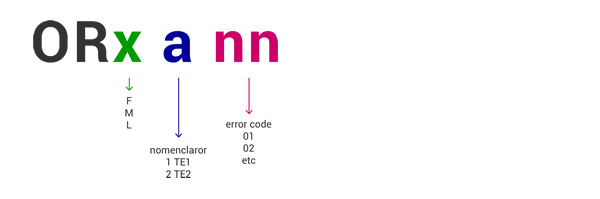
When creating an order, fields TE1 and TE2 can be used to pass custom reference information according to your business process. These fields appear in order confirmations and documents.
| Field | Max Length | Description |
| TE1 | 35 characters | Customer reference text 1 |
| TE2 | 35 characters | Customer reference text 2 |
Errors
The General Errors table can be found on the Support section.
| ERROR | DESCRIPTION |
| 400 | VALIDATION ERROR. Missing or invalid required fields. |
| 401 | ERROR IN TOKEN VALIDATION. There is an issue with the token used in the request. |
| 403 | USER NOT AUTHORIZED. There is an error in the credentials. |
| 404 | ORDER NOT FOUND. The requested order does not exist. |
| 409 | CONFLICT. Order cannot be updated in its current status. |
| 500 | GENERAL ERROR. Server side error. |