 Sign in ☰
Authentication and Authorization
Steps navigation:
• Authentication and Authorization
OAuth 2.0
Tenaris uses OAuth 2.0 framework, an industry-standard protocol to enable third-party applications to access Tenaris APIs. OAuth 2.0 focuses on API access simplicity while providing specific authentication and authorization flows for web applications, desktop applications, mobile phones, and living room devices.
Grant Types
Tenaris authentication provider supports two OAuth 2.0 grant types:
• Authorization Code - Used for server-side web applications where the source code is not publicly exposed.
• Resource Owner Password Credentials - Used for trusted applications (machine-to-machine communication) where user interaction is not possible.
Authorization Code Grant Type
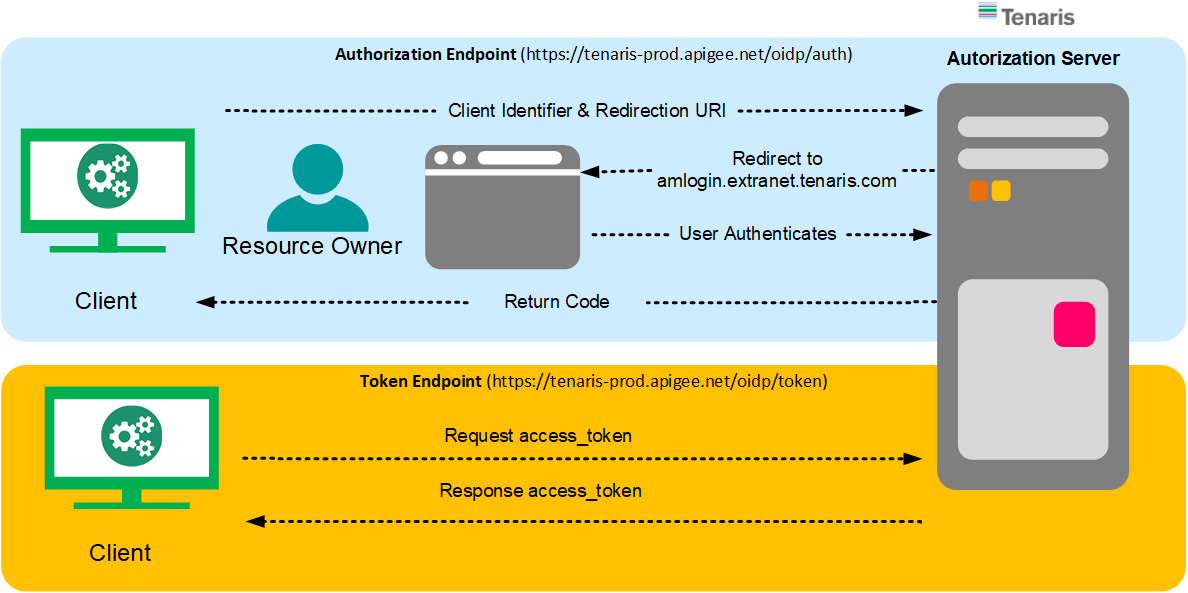
This flow is used when the application can securely store the client secret and the user can authorize via a browser.
Step 1 - Authorization Request: The application redirects the user to the authorization endpoint.
GET https://login.tenaris.com/authorize?
response_type=code
&client_id={your_client_id}
&redirect_uri={your_callback_url}
&scope=openid
&state={random_state_value}
Step 2 - Authorization Response: After user grants access, the authorization server redirects back with a code.
HTTP/1.1 302 Found
Location: {your_callback_url}?code={authorization_code}&state={state_value}
Step 3 - Token Request: Exchange the authorization code for an access token.
POST https://login.tenaris.com/token
Content-Type: application/x-www-form-urlencoded
grant_type=authorization_code
&code={authorization_code}
&client_id={your_client_id}
&client_secret={your_client_secret}
&redirect_uri={your_callback_url}
Step 4 - Token Response:
{
"access_token": "eyJhbGciOiJSUzI1NiIsInR5cCI6IkpXVCJ9...",
"token_type": "Bearer",
"expires_in": 3600,
"refresh_token": "dGhpcyBpcyBhIHJlZnJlc2ggdG9rZW4..."
}
Resource Owner Password Credentials Grant Type
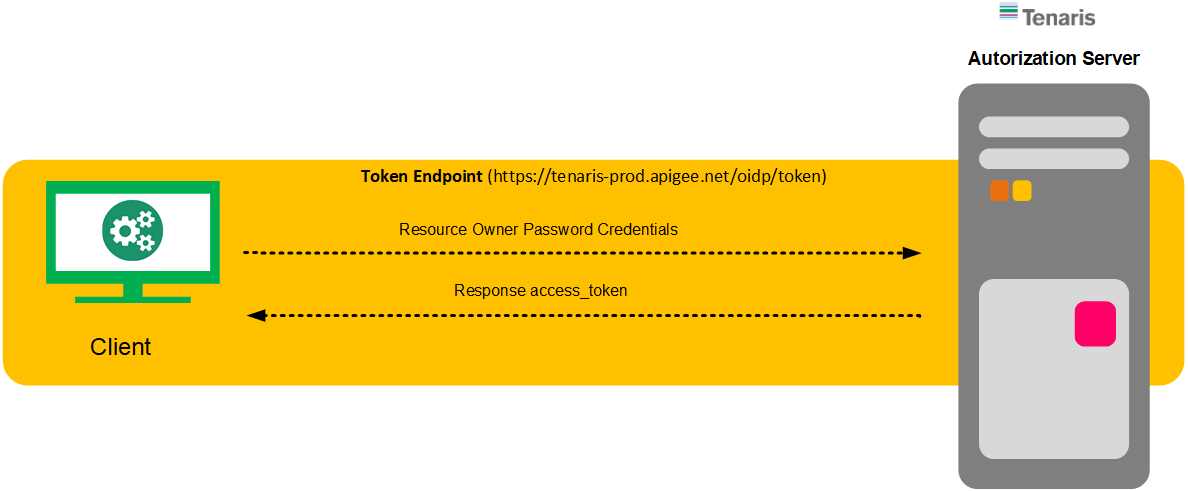
This flow is used for trusted applications (machine-to-machine) where no user interaction is possible.
POST https://login.tenaris.com/token
Content-Type: application/x-www-form-urlencoded
grant_type=password
&client_id={your_client_id}
&client_secret={your_client_secret}
&username={username}
&password={password}
Token Response:
{
"access_token": "eyJhbGciOiJSUzI1NiIsInR5cCI6IkpXVCJ9...",
"token_type": "Bearer",
"expires_in": 3600
}
Using the Access Token
Once you have the access token, include it in the Authorization header for every API request:
curl -X GET https://customerapi-dev.azure-api.net/sb/products \
-H "Authorization: Bearer {access_token}"
JWT Token Structure
The access token is a JSON Web Token (JWT) with the following structure:
• Header: Contains the algorithm and token type.
• Payload: Contains claims about the user and token metadata (issuer, expiry, subject, audience).
• Signature: Used to verify the token's integrity.
Token Expiration and Refresh
Access tokens expire after a configured period (typically 1 hour). When using the Authorization Code flow, you receive a refresh token that can be used to obtain a new access token without requiring user interaction:
POST https://login.tenaris.com/token
Content-Type: application/x-www-form-urlencoded
grant_type=refresh_token
&refresh_token={your_refresh_token}
&client_id={your_client_id}
&client_secret={your_client_secret}